NebulaDesk
The native desktop client for NebulaGraph v3
Lightweight and GPU-accelerated, written in pure Go with MyGo Native UI. Zero Electron, zero WebView — a single ~15 MB binary that starts instantly and idles at 0% CPU.
Why NebulaDesk
A graph workbench that feels instant
True native, ultra-light
No Electron, no embedded Chromium, no JS runtime. Rendered directly on the GPU — Metal on macOS, Direct3D 11 on Windows, OpenGL on Linux.
Zero-friction built-in demo
Ships with an in-memory NebulaGraph simulator preloaded with basketballplayer and tech_ecosystem — explore queries and layouts offline.
Engineered for large graphs
Strictly LIMIT-bounded expansion, O(N) spatial-hash force layout with an 18 ms frame budget, off-screen edge culling, and dense-graph LOD.
Bilingual & theme-aware
One-click EN / 中文 switching and Dark / Light / System themes in the toolbar, persisted seamlessly across sessions.
Editor & AI Workflow
Write or generate verified nGQL in seconds
Pair a Zed-style GPU nGQL editor with a read-only AI assistant that inspects your live schema, samples real vertices, and validates every query before running.
basketballplayer (4 tags, 3 edge types, 4 indexes)player & team vertices — confirmed player.age int property✓ Verified (26 rows) · 0.85 msWorks with any OpenAI-compatible API: OpenAI, DeepSeek, Qwen, Ollama, OpenRouter — with one-click Fetch Models.
Capabilities
Everything between query and insight
nGQL Code Editor
Custom nGQL syntax highlighting, context- & schema-aware autocompletion (. / : auto-trigger, v.tag.prop & $-.alias chains), bracket auto-closing, hover docs, and diagnostics.
Interactive Graph Canvas
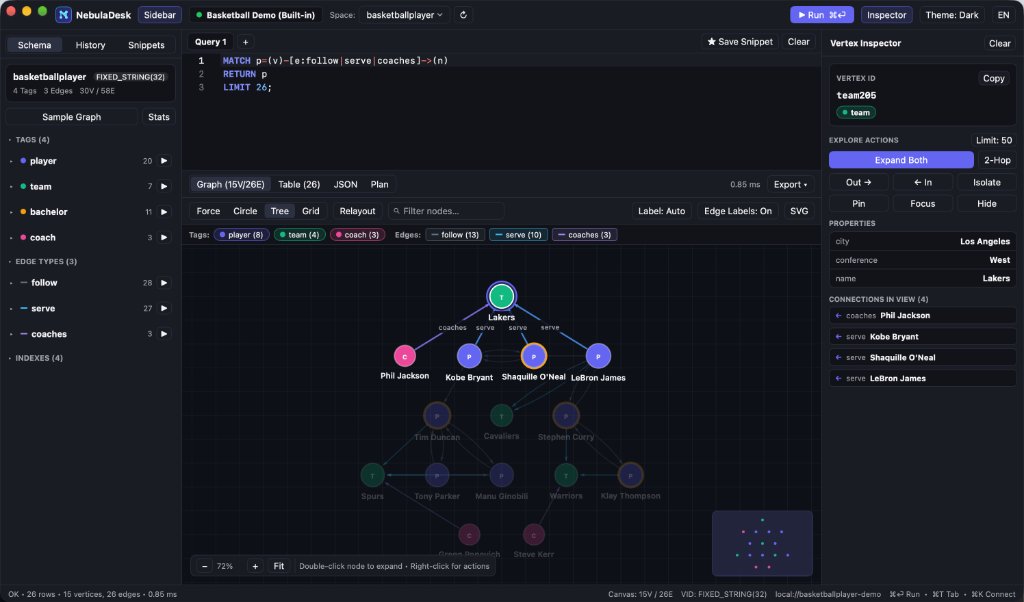
GPU-drawn 2D canvas with Force, Circular, Hierarchical Tree, and Grid layouts, curved Bézier parallel & @rank edges, self-loops, 1-hop spotlight, live minimap, and SVG / JSON export.
Double-Click Expansion
Double-click any node or use the Inspector for strictly LIMIT-bounded directional expansion (Both, Out →, ← In, 2-Hop) without stalling on super-nodes.
Multi-View Results & Magnifier
Switch between Graph, sortable/filterable Table with inline cell & row magnifier (formatted Path / JSON preview), formatted JSON, and EXPLAIN / PROFILE physical plans. Export to CSV or JSON.
Schema, History & Snippets
Auto-refreshed space switcher, expandable Schema tree with golden index key indicators, SHOW STATS counts, searchable query history, and persistent favorite snippets.
Connection Manager
Manage multiple saved NebulaGraph v3 cluster profiles — single or multi-host host:port seeds, TLS / SSL toggle, and default space — right next to the built-in demo engine.
Keyboard-First
Built for speed
Navigate schemas, run queries, invoke AI, and explore subgraphs without leaving the keyboard.
Download
Get NebulaDesk v0.2.0
Pre-built native binaries and installers available on GitHub Releases.
macOS
Apple Silicon & Intel · .dmg / .app.zip
Windows
x64 · .exe / .zip
Linux
x64 & ARM64 · .tar.gz / .deb
macOS Gatekeeper & Windows SmartScreen
Because NebulaDesk is an open-source app not yet notarized with a paid Apple Developer ID, drag NebulaDesk.app to /Applications and run the command below (or open System Settings → Privacy & Security → Open Anyway). On Windows SmartScreen, click More info → Run anyway.
xattr -cr /Applications/NebulaDesk.app
Build from Source (Go 1.27+, no C compiler or Node.js required)
CGO_ENABLED=0
CGO_ENABLED=0 go build -ldflags="-s -w" -o nebuladesk .